Resize Video
An Online Video Resizer to Share Any Type of Video on Any Social Media Platform.
Edit your videos on Windows, Mac, or even using your phone. And the best part? All without losing quality.
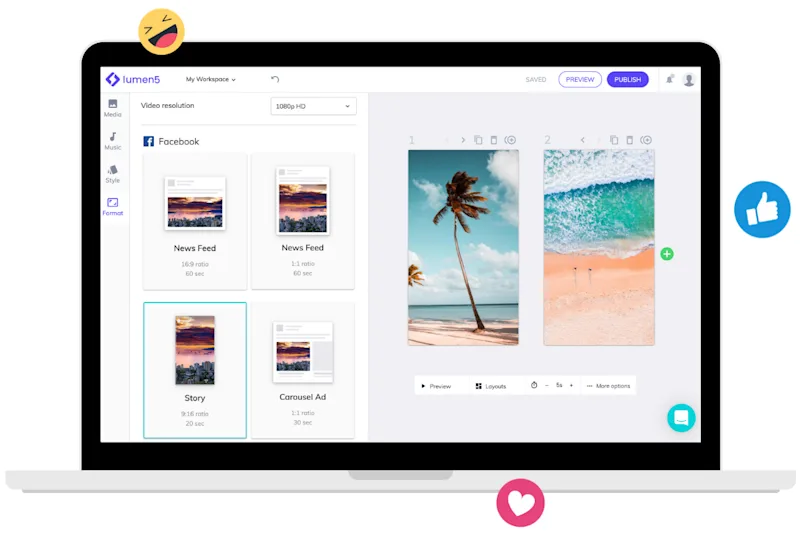
Change video dimensions online with a few clicks
Customize size or choose a dimension from the suggested options
How to resize your video online in 3 steps
Get started for free →
STEP 1
Choose a video
Upload the file you wish to resize from your desktop, mobile, Google Drive, or Dropbox. You can also add a link to a YouTube video. Files up to 500 MB are completely free.
STEP 2
Resize your video
Once your video is uploaded, you can select the ideal dimension preset. You can also make zoom and crop adjustments. Then specify the best format for the output file.
STEP 3
Download your resized video
If you’re happy with the result after watching the preview, your video is ready to be saved. To do that you just need to click the download button. If you prefer, you can also save it back to Dropbox or Google Drive.
World-class video marketing content. Made in minutes. No video editing skills required. Sign up for free today to grow your brand.
Tips and tricks for effortless video production
Learn how our customers save time and boost engagement with Lumen5




Join over 5,000,000 companies using Lumen5 to tell their stories.
Lumen5 is a video creation software that helps marketers, publishers, and brands create video content in a breeze, without any technical expertise.
Sign up free