Screen Recorder for Creating Videos in Minutes
Record your screen, voice, and camera in one take, then instantly turn it into polished, on-brand videos. Lumen5’s Screen Recording feature helps teams create walkthroughs, training, updates, and tutorials fast, without complex editing tools.
Record screen + mic + camera
Capture your full screen, a browser tab, or a window, plus voiceover and optional webcam for a more personal touch ➜ clearer communication with fewer meetings.
Instant captions + clean layouts
Auto-generate captions and place your recording into a professional video layout ➜ ready to share with no manual formatting.
Brand it like everything else
Apply your fonts, colors, logo, and styles automatically ➜ every recording stays consistent and on-brand.
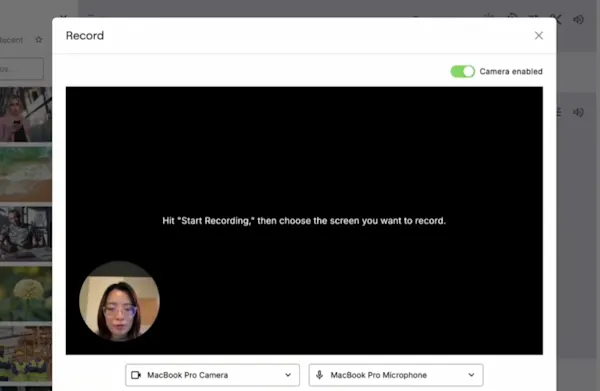
Record anything without setup headaches
Start recording right away. Capture walkthroughs, training sessions, updates, or how-tos using a simple recorder that doesn’t require extra software.
What you can record:
Full screen, specific window, or browser tab
Voice narration (mic)
Optional webcam overlay
System audio when needed
Why it helps:
Makes it easy to show, not just tell
Cuts down back-and-forth and meeting time
Helps anyone on the team create useful videos fast
Outcome: A clean, high-quality recording ready to polish, brand, and share.
Turn recordings into engaging videos, not raw screen captures
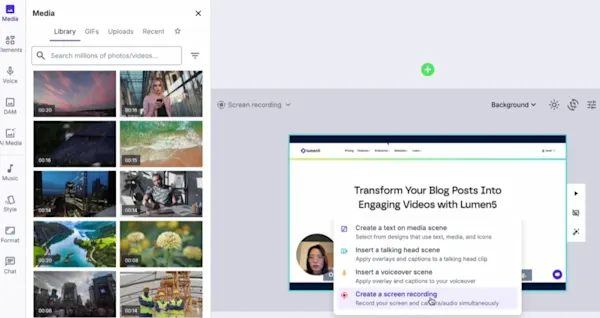
A screen recording is just the start. Lumen5 transforms your capture into a share-ready video format with structure, captions, and design built in.
Why it helps:
Keeps viewers engaged with readable captions and clean formatting
Makes videos easier to follow, especially on mobile
Helps your message land even if people watch on mute
Outcome: A professional-looking video people can watch and understand without needing an editor.
Reuse and publish across every channel

Once recorded, you can quickly tailor your video for different destinations, audiences, and formats.
Why it helps:
Speeds up production across teams and channels
Eliminates tool hopping since recording, captions, branding, and export happen in one workflow
Makes it easy to build a reusable library of videos
Outcome: One recording becomes multiple on-brand video assets you can use everywhere.
You can record your full screen, a browser tab, or a specific window, plus your microphone and optional webcam. It’s ideal for walkthroughs, tutorials, training, updates, and support guides, all captured in one take.
No. Screen Recording works directly in Lumen5, so you can start recording without installing extra tools. Just choose what to capture, hit record, and you’re ready to go.
Yes. Lumen5 can generate captions automatically, so your video is easier to follow and works better for viewers watching on mute. You can review and edit captions before exporting.
Yes. You can apply your brand kit, including fonts, colors, and logo, so every recording looks consistent and professional. This helps teams keep a unified look across all video content.
You can export in 9:16 or 16:9 so your recordings can be shared across major platforms and destinations. Reframing helps your content look right whether it’s viewed on mobile, desktop, or in a presentation.
Yes. Teams can review recordings, leave comments, and iterate quickly. This makes it easy to get approvals and ship videos faster without long back-and-forth threads.
