In App Recording for Effortless Video Creation
Record, edit, and publish videos in one seamless workflow. With Lumen5’s In App Recording feature, you can capture webcam videos directly inside the platform, receive an instant transcript for text based editing, and polish your final video with captions, graphics, and on brand styling. No extra software required.
Step 1: Record inside Lumen5
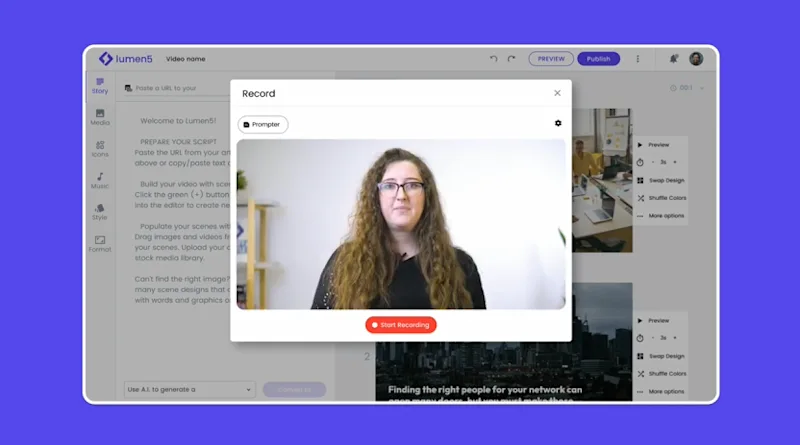
Capture your webcam video with a single click. No switching between apps or setting up complicated tools.
Step 2: Auto transcribe and edit
Lumen5 instantly converts your audio into an editable transcript. You can trim, cut, and refine your video by selecting text instead of managing a traditional timeline.
Step 3: Polish and publish
Add captions, callouts, lower thirds, and your brand elements. Export and share your finished video within minutes.
Record Without Extra Software
Skip the hassle of opening Zoom, OBS, or external recording tools. Lumen5 allows you to record professional quality videos directly in the platform. This keeps your workflow streamlined and helps teams produce more content in less time.
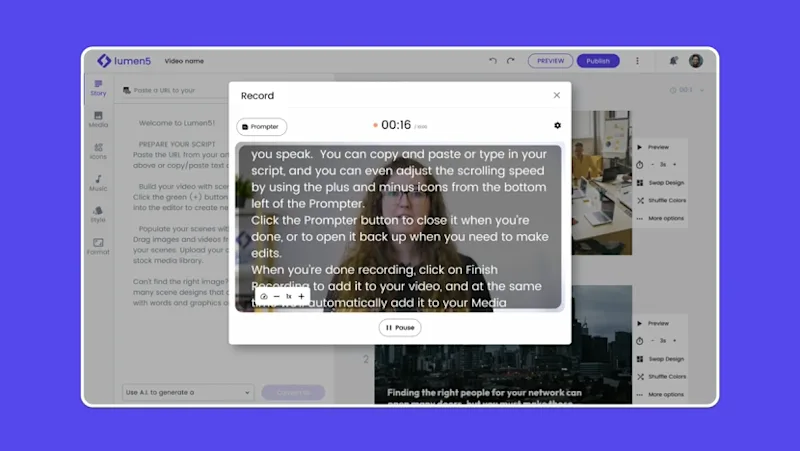
Stay On Track with the Built In Teleprompter
Record confidently with Lumen5’s integrated teleprompter. Load your script, read naturally, and maintain strong eye contact. The teleprompter ensures smooth delivery without the need to memorize lines, making it ideal for team updates, training material, product explainers, and thought leadership content.
Perfect for Presentations, Tutorials, and Updates
In App Recording is ideal for creators, educators, and business teams who need to produce clear and engaging videos quickly. Whether you are delivering a company announcement, teaching a concept, or recording a product walk through, Lumen5 gives you everything you need in one place.
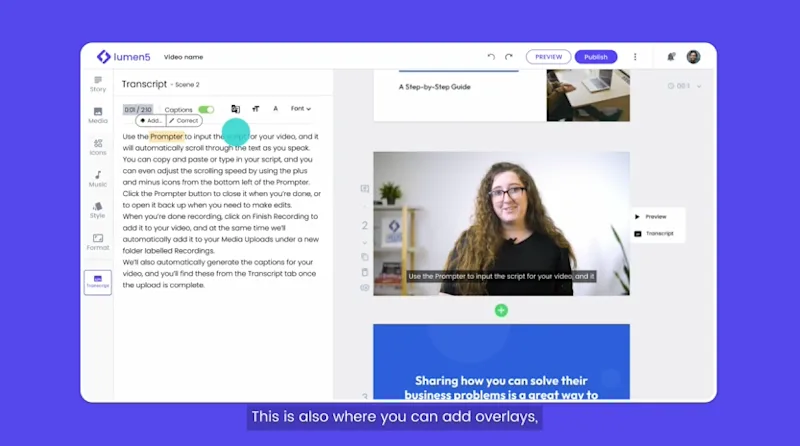
Lumen5 eliminates the need to juggle separate tools like Zoom, OBS, or screen recorders. You record your webcam video directly inside the platform, receive an instant transcript, and edit through text based controls instead of complex timelines. This unified workflow dramatically reduces production time for marketing teams, educators, and internal communications.
Yes. In-App Recording is designed for people who are not professional creators. Features like the built in teleprompter, transcript based editing, and automatic captions help beginners produce polished, on brand videos without technical knowledge. Many teams adopt Lumen5 because it simplifies both recording and editing for non specialists.
Lumen5 lets you apply your brand colors, fonts, lower thirds, callouts, and watermarks directly to your recording. This ensures your videos follow brand guidelines across training, product updates, onboarding, and social content. Enterprise teams often rely on this to keep global communication visually consistent.
The feature works well for tutorials, announcements, product walkthroughs, internal updates, onboarding training, and short educational clips. Creators use it for quick thought leadership videos, while L&D teams use it to produce instructor led lessons with minimal prep time. If you need a fast, clear, face to camera message, In-App Recording is ideal.
Yes. After recording, you can enhance your video with stock footage, uploaded media, cutaways, callouts, and AI generated visuals. This allows you to transform a simple webcam recording into a fully designed, multi layer video without leaving the platform.
Lumen5 uses advanced speech recognition to generate highly accurate transcripts. Editing is as simple as selecting words or sentences that you want to trim or keep. This makes precision editing faster than traditional timeline tools and ensures your final video aligns perfectly with your spoken audio.
