Lumen5 + Claude
From first draft to finished video
Work through your script with Claude, then hand it straight to Lumen5. Claude asks which workspace to use, applies your styles and comes back with a link to the video, in Claude or Claude Code.

Why Claude and Lumen5 work well together
Your script, word for word Claude is great at shaping long-form writing. When you're happy with a script, Lumen5 uses it exactly as written for the voiceover, so nothing gets lost between the draft and the video.
Context Claude already has Paste in a report, a long article or your notes and Claude can condense them into a tight script before creating the video, all in the same conversation.
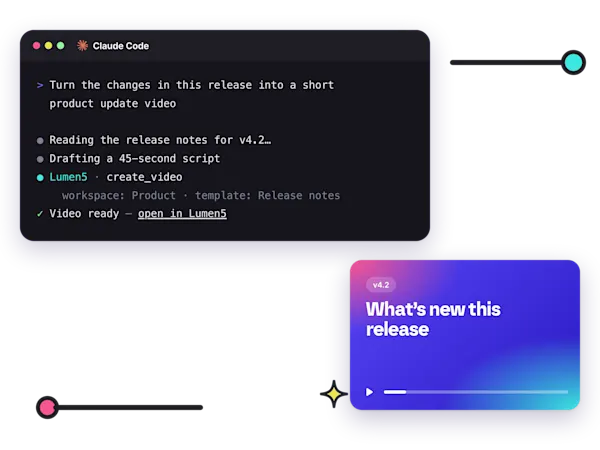
Also in Claude Code Developers and product teams can create videos without leaving the terminal, for example turning release notes into a product update video.

Ideas to try
“I like this script. Please turn it into a Lumen5 video.” The simplest way in: finish a script with Claude and ask for the video.
“Summarize this whitepaper into a 60-second explainer using our brand kit.” Claude condenses the source, then sets the length and brand kit for you.
“Make a 10-second test video in Lumen5.” A quick way to check that the connector is working.
“Turn the changes in this release into a short product update video.” Works well in Claude Code, where Claude can read the changes itself.
Set it up in four steps
Open Claude's connector settings Go to claude.ai/admin-settings/connectors.
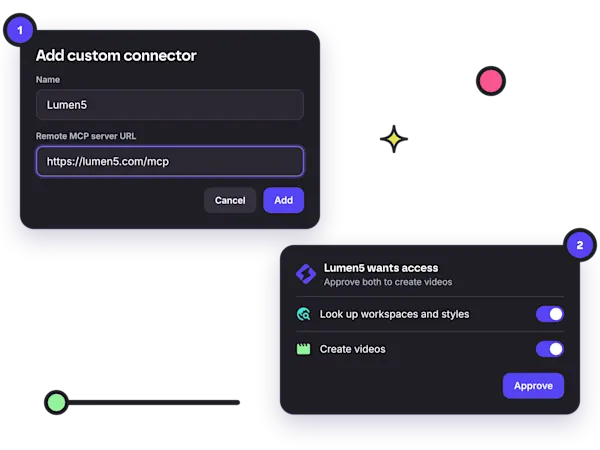
Add a custom connector Choose + Add, then Custom and Web. Name it Lumen5 and enter the URL https://lumen5.com/mcp.
Approve access Accept the detected capabilities and sign in to Lumen5. Approve both permissions so Claude can create videos, not just look things up.
Start a new chat Check that the Lumen5 connector is turned on in the chat's connector menu, then ask for your first video.
FAQ
Does it work in Claude Code?
Yes. The same Lumen5 connector works in Claude and in Claude Code.
Where do my videos end up?
Claude asks which workspace to use, then replies with a link a few minutes later. The video opens in the Lumen5 editor so you can fine-tune it.
Can Claude use our templates and voices?
Yes. Ask for a specific template, AI voice, brand kit or blueprint, or leave it out and Lumen5 chooses.
Who can create videos this way?
Anyone who can create videos in the workspace. Viewers and reviewers can look things up but can't create videos, just as in the Lumen5 app.

Join over 5,000,000 companies using Lumen5 to tell their stories.
Lumen5 is a video creation software that helps marketers, publishers, and brands create video content in a breeze, without any technical expertise.
Sign up free