

Your Audience Wants More Video. Your Budget Didn’t Get the Memo.
Inside the Always-On Video Content Loop: how Lumen5 and Hootsuite help teams spot a trend, make the video, publish it, and learn from it, all in a matter of hours.
TL;DR: The Always-On Video Content Loop in 60 seconds
- The problem: Video demand keeps climbing while budgets and headcount don’t, and by the time a video clears production, the trend it was made for has often moved on.
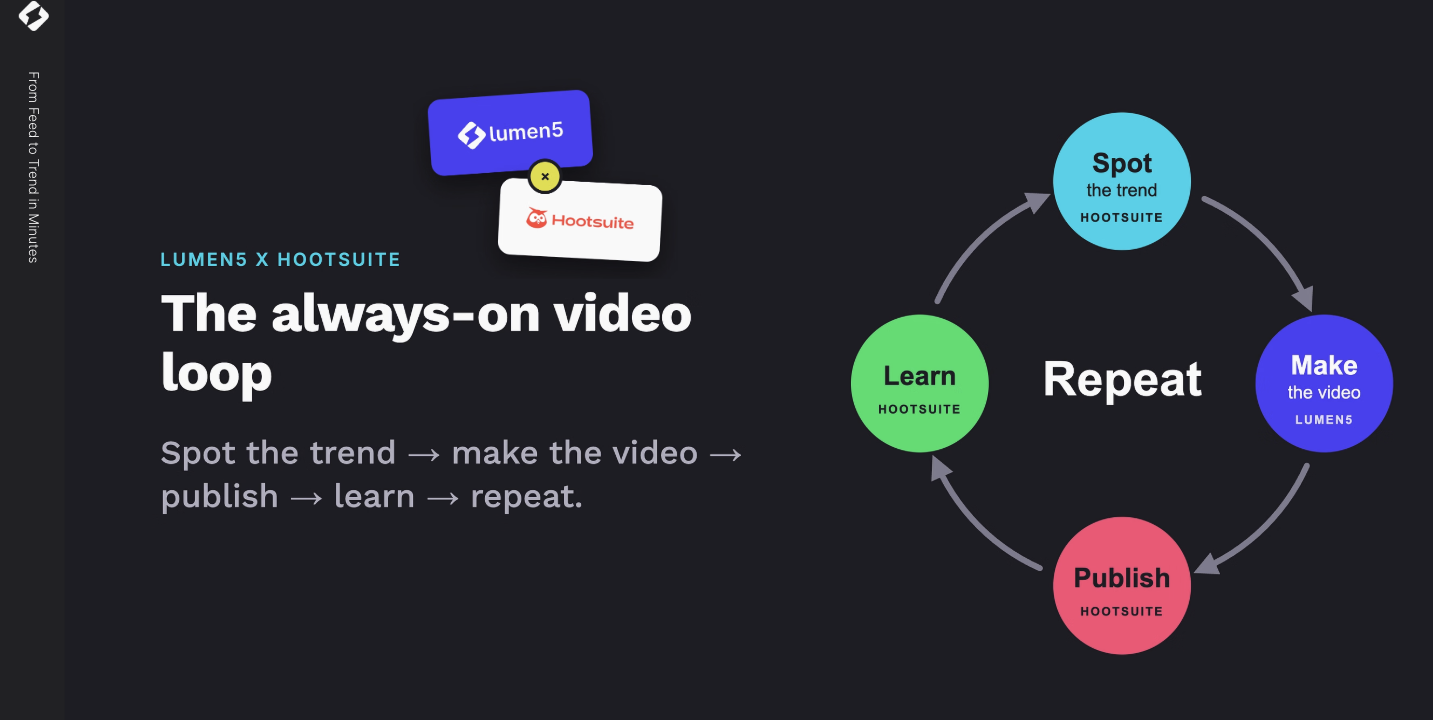
- The loop: Spot the trend, make the video, publish it, learn from it, repeat. The goal is to run the whole cycle within hours, not weeks.
- Make it: Lumen5 plugs into the tools your team already uses through three integration levels: the Lumen5 API, workflow automation with Zapier or Make, and MCP (Model Context Protocol) for ChatGPT, Claude, and Microsoft Copilot.
- Shape it: Lumen5’s new Agent lets you create and edit video through conversation, using “recipes” for different video types.
- Ship it and learn from it: Lumen5 videos show up in Hootsuite’s media library, where you can publish, respond to comments, track the conversation, and ask Hootsuite’s AI which videos worked best.
The Trend Waits for No One
Here’s a sentence every marketer has lived: the video finally clears legal, brand, and the stakeholder who only reads emails on Thursdays… and the moment it was made for is already over.
That was the starting point for our recent webinar with Hootsuite, The Always-On Video Content Loop. Pius Chan, VP of Growth at Lumen5, set the table with a line that got a few knowing nods:
“Your audience wants more video, your budget doesn’t. And by the time a video clears production, the story it was created for has often moved on.”
Trends now have roughly the shelf life of an oat milk latte left on a desk. So the question isn’t whether to make more video. It’s how to make it fast enough to matter.
Pius served the agenda as a three-course meal (appetizers, first, second, and third course), and honestly, we’re keeping the menu. It’s a good menu. On it:
- Nigel Gutzmann, CTO at Lumen5, on getting video made without adding work to anyone’s plate
- Pius Chan, walking through Lumen5’s new Agent
- Ben Cathers, Senior Principal Solution Consultant at Hootsuite (13+ years there, working with their largest clients worldwide), on what happens after the video’s made
What Is the Always-On Video Content Loop?
The Always-On Video Content Loop is a repeatable cycle for social video: spot a trend, make the video, publish it, learn from how it performs, and repeat. The goal, as Pius put it, is to run the whole loop “within hours,” so you’re catching trends while they’re still trends.
It matters for four reasons Pius laid out:
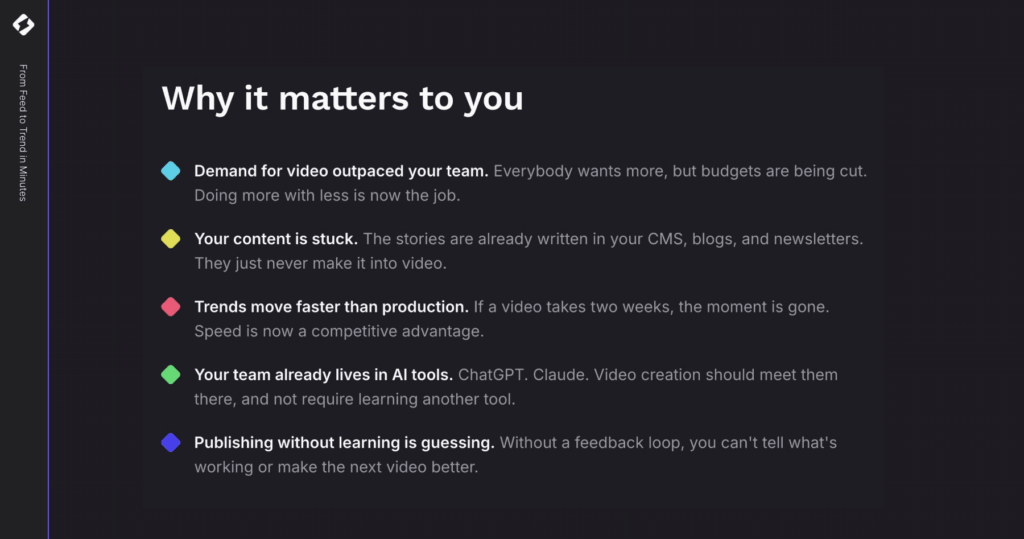
- Demand for video has always outpaced what teams can produce.
- You already have the raw material. It’s sitting in your blog, your chat channels, and a dozen other places. “It’s just a goldmine, ready to be dug up,” Pius said, “but it’s stuck there.”
- Your team already lives in AI tools, so video creation needs to plug into those, not compete with them.
- Without performance tracking, you’re guessing. No feedback loop, no loop.
Why Can’t Marketing Teams Keep Up With Video Demand?
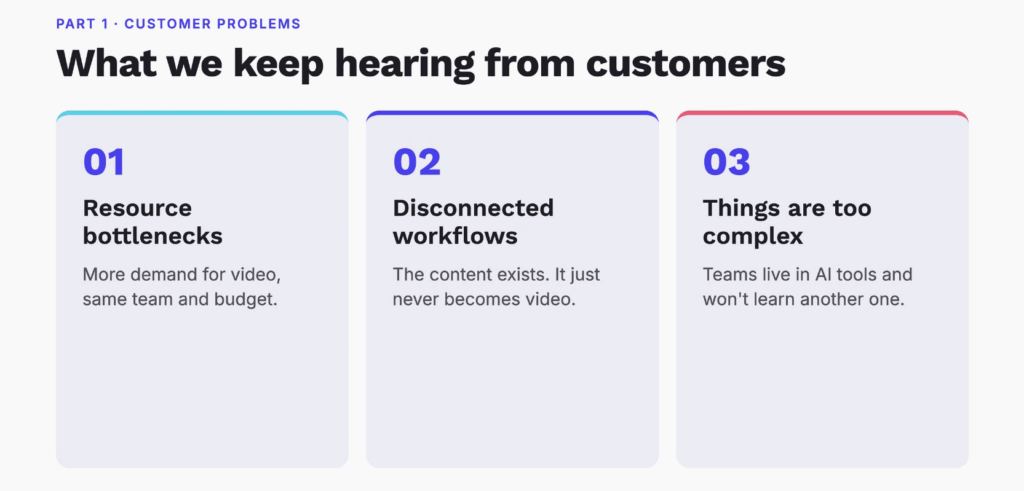
Before Nigel showed any tech, he shared what Lumen5 keeps hearing from marketing and comms teams. The problems fall into three buckets, and odds are at least one of them is currently sitting in your inbox.
Bucket 1: Simple math
Every channel wants video. Every stakeholder wants video. Budgets and headcount, meanwhile, are walking in the opposite direction. Nigel reframed the challenge neatly:
“The question isn’t, how do we make better videos? It’s how do we make a lot more of them with the team that we already have.”
Bucket 2: The content is stuck somewhere else
Teams ask things like “the content’s already in our CMS” or “does this connect to SharePoint?” And then there’s Nigel’s favourite piece of customer feedback:
“I didn’t think of making a Lumen5 video.”
Brutal. Honest. Extremely useful. As Nigel explained, “The problem isn’t that people don’t want video. It’s that video lives in a separate tool, in a separate tab, and it’s not part of how they are already working.” The blog post goes live, the newsletter goes out, and nobody thinks to turn either one into video. Your archive is basically a storage unit full of videos that haven’t been told they’re videos yet.
Bucket 3: Nobody wants another tool to learn
Your team has picked its tools. They’re in ChatGPT or Claude all day. “Asking them to learn one more platform, even a good one, is a real barrier,” Nigel said. If video is going to grow across a team, it has to meet people where they already work.
How Do Workflow Integrations Bring Video Into the Tools Teams Already Use?
Lumen5’s answer is workflow integrations. In Nigel’s words:
“Instead of asking people to come to Lumen5, we’re bringing Lumen5 into the systems and tools they’re already using.”
There are three ways to do it. Nigel calls them levels, not because one beats another, but because each trades off control against effort.
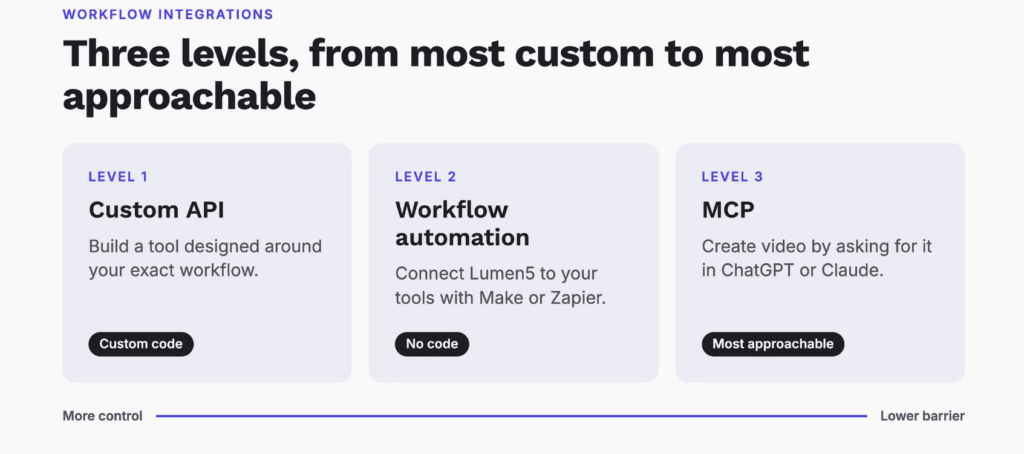
Level 1: The Lumen5 API (max control, max effort)
The API is for teams who want to build video creation right into their own tools. One Lumen5 customer that produces educational content is connecting its course-writing tool directly to Lumen5. The moment course content is written, a video draft gets created automatically, and all that’s left is for a human to review and approve it.
“Video isn’t a separate project anymore,” Nigel said. “It’s just a step in the process they already run.”
Yes, the API means custom code. But Nigel had good news for anyone who just felt their engineering team sigh:
“With AI, custom code is getting cheap. Things that used to take an engineering team months now take days.”
Level 2: Workflow automation with Zapier or Make (no code required)
Here, you connect Lumen5 to your other tools with triggers and actions in a drag-and-drop builder. One customer publishes a daily finance briefing for employees and followers, sent by email and released as a podcast on Spotify. With a workflow automation, that same briefing now also becomes a YouTube video every day. Same content, new channel, zero extra production work.
Level 3: MCP (the newest, and the most approachable)
MCP stands for Model Context Protocol, which sounds like something you’d need a lanyard and a security clearance to touch. Nigel promised otherwise: “Even though it sounds complicated, it’s actually the most approachable.”
MCP lets AI assistants like ChatGPT, Microsoft Copilot, and Claude connect directly to Lumen5. Your team asks for a video in the AI tool they already have open, and that’s it. No new interface to learn.
Nigel showed it live. He copied the link to Hootsuite’s 2026 social media trends resource, opened ChatGPT, asked for an overview video of the article, and tagged the Lumen5 Video Creator. ChatGPT asked which Lumen5 workspace to use, and then Lumen5 got to work: pulling the content, applying the right branding, writing the script, and generating a draft. The finished video played right inside ChatGPT, with an “edit and publish” button that opened the draft in Lumen5, ready for review.
Which Lumen5 Integration Is Right for Your Team?
Nigel boiled the decision down to one question: are you trying to scale a format, or scale adoption?
| If your goal is… | Use… | Why |
|---|---|---|
| The same kind of video over and over (daily briefings, weekly product updates, a video for every blog post or course) | API or Zapier / Make | Once it’s set up, it runs on its own. API if you want it built into your existing tools, workflow automation if you’d rather skip the code. |
| More people on your team making video, with a lower barrier to start | MCP (ChatGPT, Claude, Copilot) | People ask for a video in the AI tool they already use, and they’re off. |
And you don’t have to pick just one. Nigel’s advice:
“Automate the recurring stuff, and give everyone else MCP for the one-offs.”
You can explore every option in the Lumen5 integration library.
The Best Email You’ll Get All Week
Pius painted a picture that made the whole integration story click. Say a teammate publishes a new blog, or your product team ships a feature with a knowledge base article, and that source is connected to Lumen5 through Zapier. All the early steps of starting a video happen in the background, overnight.
“For every new blog, every new article, you get that email in the morning that says your video is 80% done.”
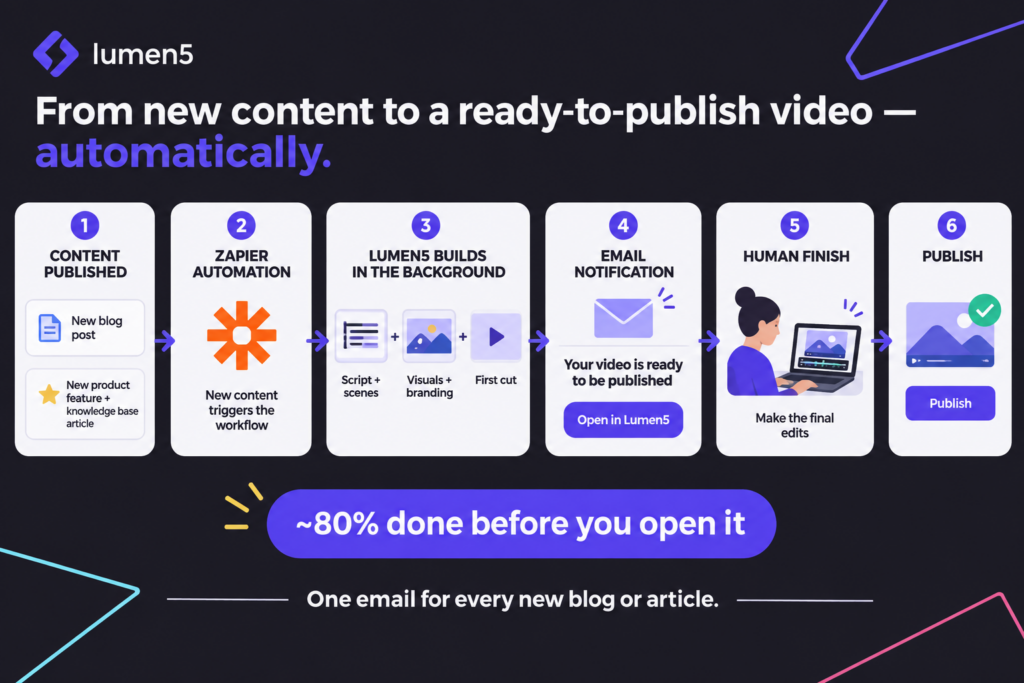
You open the email, click into Lumen5, add the final human touches, check everything, and publish. It’s the rare email that says work got done without you, and it arrives before your coffee does.
What Is Lumen5 Agent?
Once you’re inside Lumen5, things have changed. The classic creator is still there for anyone who loves it. But there’s now a second path: Agent, a new way to create video through conversation.
Pius started with something every marketer knows:
“You can usually see a video in your head. You know the message, you know who it’s for, you know what you want it to say and feel. The hardest part has always been around the making of a video.”
Picking templates, finding visuals, laying out scenes, nudging things until they look right. That’s the part Agent takes off your plate. As Pius put it, Lumen5 asked a simple question: “What if you could just tell Lumen5 what you want it to do?”
With Agent, you describe what you want, who it’s for, and the look you’re after, and it builds the video scene by scene. The shift, according to Pius:
“You spend less time figuring out how to make a video, more time deciding what you want it to look like, by just talking to it.”
What are Agent recipes?
Fitting the menu theme, Agent runs on recipes. A recipe is a type of video, like a brand story, a product walkthrough, a screen recording, or an explainer. Each one gives Agent a starting structure, so it knows how to tell that kind of story before it builds a single scene.
Why bother? Because a product walkthrough and a brand story shouldn’t share the same pacing, structure, or goals. “Recipes give our agent that know-how,” Pius said, “so you don’t have to spell it out.” And you’re never locked into the first draft. Customize as much as you like.
What it looks like in practice
For the demo, Pius used the same Hootsuite Social Media Trends 2026 page, with one goal: a video that previews the report and nudges people to download it. His prompt read like a brief you’d give a colleague:
- Write a script from this URL, then build the video from it
- Make it a one-minute listicle using the article’s four key headers
- Under each header, briefly explain the category while keeping viewers curious to learn more
- Use a calm, comforting female voiceover
- Keep scenes to about five seconds and alternate them
There was no Hootsuite brand template in his account, so Pius looked up Hootsuite’s brand colours and simply told Agent which ones to use. Then he picked the “explaining ideas” recipe, asked for landscape format, and hit create. A full build takes around six to eight minutes depending on script length (he’d made one the day before with the exact same prompt, because live demos and patience are rarely friends).
Then the fun part: editing by talking. Swap the media on any scene. Cut it down to 30 seconds. Remove scenes. Make text pop up at two seconds in. Change the template. Translate the whole thing into another language.
“Now I’m not clicking through. I still can, for those of us who are familiar with classic Lumen5, but I can just talk to it.”
For anyone who’s ever hunted for the one tiny button that does the one tiny thing, that’s a very good sentence.
What Happens After the Video Is Made?
Making the video is half the loop. Ben Cathers from Hootsuite took it from there, walking through Hootsuite Social OS, Hootsuite’s AI-powered social operating system. It’s made up of:
- Perch for content creation, planning, and publishing (paid and organic)
- Nest for customer care and social conversations
- Lumen by Talkwalker for listening to conversations worldwide (yes, Hootsuite’s listening tool is called Lumen; no relation, we just admire the taste)
- Parliament for employee advocacy, so your people can share that fresh video to their own channels
- Wisdom, Hootsuite’s AI that ties it all together
Publish: from Lumen5 to every channel in one click
In Perch, Ben opened his media library and there they were: his Lumen5 videos. The video Pius had just made was one click away, ready for Instagram, TikTok, YouTube, Facebook, or any network that supports video. From there he could preview it as a Reel or a Story, choose a thumbnail, add caption (SRT) files, let Hootsuite’s AI polish the copy in his brand voice, and drop a link in the first comment.
Why the obsession with speed? Ben’s clients told him plainly:
“We need to be able to be on top of the current trend right now. We don’t have 6 hours. We don’t have 12 hours for a campaign brief to be approved. We need to get that video out.”
Once a video is created in Lumen5, it’s instantly available in Hootsuite, plotted on the content calendar, with the option to put paid spend behind it.
Engage and listen: what is the world saying?
Once it’s live, Nest pulls in conversations about your video across Facebook, Instagram, LinkedIn, TikTok, X, YouTube, your website chat, and more, with AI to help draft responses. Lumen by Talkwalker zooms out further, listening across what Ben described as hundreds of millions of sources: social networks worldwide, news, broadcast, podcasts, Reddit, and even what AI systems are saying about a topic. AI then summarizes the leading conversations and groups them into themes.
Learn: which videos actually worked?
Hootsuite’s analytics show views, paid versus organic, follower growth, reactions, and comments. With Google and Adobe integrations, you can follow viewers from the video to your website and see whether they downloaded the report or signed up. Then comes the question that closes the loop. Ben asks Wisdom:
“Tell me, across all our accounts, what were our top performing posts, what were our top themes, and tell us which videos worked the best.”
With that answer in hand, you head back to Lumen5, prompt more of what’s working, and the loop starts again.
How Does the Loop Close?
Pius wrapped things up by connecting the last course back to the first. Most companies are sitting on hundreds of blog articles, white papers, and reports. With limited time, the hard part is choosing which ones deserve to become video.
“How do we pick the top-performing ones to turn into video? And now we can.”
Hootsuite tells you what’s resonating. Lumen5 turns it into video, through an integration or a quick chat with Agent. Hootsuite publishes, tracks, and tells you what worked. If one report is performing brilliantly, you can spin up several more videos to support it. Spot, make, publish, learn, repeat. No marathon production cycle required.
Pius also noted that these integrations, and Agent, are already available in Lumen5 customers’ accounts. His advice: play with it, talk to it, and tell your CSM how it goes.
FAQ: The Always-On Video Content Loop
What is the Always-On Video Content Loop? It’s a repeatable process for social video where teams spot a trend, create a video, publish it, measure performance, and use what they learn to make the next video. Lumen5 handles video creation and Hootsuite handles publishing, engagement, listening, and analytics, so the loop can run in hours instead of weeks.
Can I create Lumen5 videos inside ChatGPT, Claude, or Microsoft Copilot? Yes. Lumen5’s MCP (Model Context Protocol) integration connects AI assistants like ChatGPT, Claude, and Microsoft Copilot directly to Lumen5. You ask for a video in the chat, pick your workspace, and Lumen5 generates a branded draft you can preview in the chat and then edit and publish in Lumen5.
What is MCP in video creation? MCP, or Model Context Protocol, is a standard that lets AI assistants connect to other software. For video, it means your team can create a Lumen5 video just by asking for it in the AI tool they already use, with no new interface to learn.
What’s the difference between the Lumen5 API, Zapier/Make, and MCP? The API gives the most control and requires custom code, so it suits teams building video into their own tools. Zapier and Make automate recurring video formats with no code. MCP is the most approachable and suits teams that want more people making one-off videos. Many teams combine them: automation for recurring content, MCP for everything else.
What is Lumen5 Agent? Agent is Lumen5’s new way of creating video through conversation. You describe the video you want, who it’s for, and the look you’re going for, and Agent builds it scene by scene. You can then edit it by asking, for example, to swap media, shorten it, change the timing of text, switch templates, or translate it.
What are recipes in Lumen5 Agent? Recipes are video types, such as a brand story, product walkthrough, screen recording, or explainer. Each recipe gives Agent a starting structure for that kind of video, so the pacing and storytelling fit the goal without you having to spell it out.
Does Lumen5 integrate with Hootsuite? Yes. Lumen5 videos appear in the Hootsuite media library, so you can publish them in one click to Instagram, TikTok, YouTube, Facebook, and other networks that support video, then track engagement and performance across Hootsuite Social OS.
Your Next Video Might Already Be 80% Done
We started Lumen5 to make video easy for everyone to create, and this webinar felt like a real step toward that: video that starts in the tools you already use, takes shape through a conversation, and gets smarter every time it goes out into the world. A huge thank you to Nigel and to Ben from Hootsuite for sharing their time and expertise with us.
If you’d like to see the full demos (including the moment the video plays right inside ChatGPT), watch the full webinar here. And if you’re ready to start your own always-on loop, visit lumen5.com and explore our integrations. We’d love to see what you make.
Watch the whole webinar here for much more!