



For a long time, adding a transition between scenes in Lumen5 meant combining a different tool. Transitions were built into scene designs behind the scenes, and if a design didn’t come with one, you were out of luck. You couldn’t add it yourself. That was fine if you were the one setting them up. Not so fine if you were staring at a cut you wanted to smooth over.
That’s changed. We just shipped a full transitions library, rolled out to everyone.

What actually changed
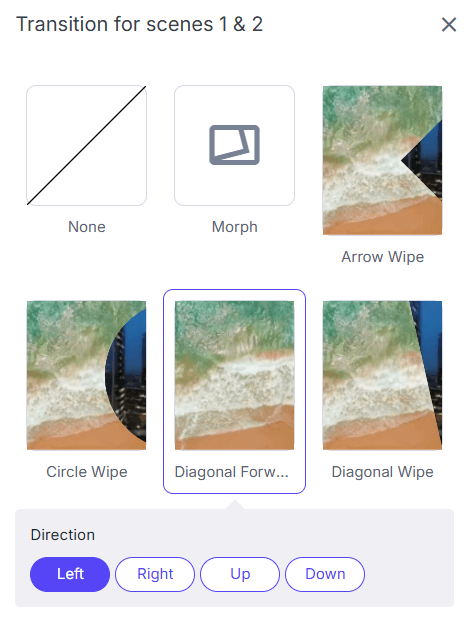
There’s now a transitions tab with a library of options you can drop between any two scenes in your video. Pick one, apply it, move on. No setup behind the scenes, no waiting on anyone, no scene design lottery deciding whether a transition exists. If you want your scenes to flow into each other, that’s your call, on any project, as many times as you like.
It’s a small tab with a big payoff. Transitions are one of those things you don’t notice when they’re good, but you always notice when they’re missing.
Why it’s worth two minutes of your time
Here’s what transitions actually do for you.
They make your videos look finished. A hard cut between scenes reads as a rough draft. A clean transition reads as something someone who knows what they’re doing made. Same footage, same script, but the difference is polish, and polish is what makes a viewer trust what they’re watching.
They keep you on-brand and consistent. When you control the transitions, you control the feel. You can carry the same rhythm across every scene, and every video your team makes, so everything looks like it came from the same place. That consistency is one of the most valuable things a brand owns, even if nobody talks about it much.
They save you the back-and-forth. Self-serve means no filing a request or waiting for a design update. You see a cut you don’t love, you fix it right then, and you keep moving. Faster to a video you’re actually happy to publish.
The bigger picture: AI video is growing up
There’s a shift happening in AI video worth pointing out. The early thrill was watching a tool spit out a flashy clip from a prompt. That was magic, for a while. But “it made something” was never really the goal for marketers. The goal is a finished, on-brand video you’d actually put your logo on.
That’s where the whole space is heading: away from novelty, toward control. Nobody’s asking “can AI generate video?” anymore. It clearly can. The real question is “can you shape the result until it’s genuinely yours?” A transitions library is a small, concrete piece of that answer. It’s one more decision that used to be made for you, now handed back.
We think that’s the right direction. The AI should do the heavy lifting, turning your ideas into scenes in minutes, and you should keep your hands on the details that make it feel like your brand and not a template.
Give it a spin
Next time you’re editing, open the transitions tab and try smoothing a cut or two. It takes a few seconds, and it’s the kind of small touch that makes a video feel a lot more finished.
Happy editing, and let us know which transitions become your go-to.